Sofia just now
“Remember our first road trip? You argued about the playlist for an hour. Never change.”
Paper guest books reach only a handful of guests before they disappear behind the head table. Wedibox turns your QR code into a digital guest book every guest can use from their own phone. Scan, write a message, upload a photo, done. No app download. No signup. Takes 20 seconds.
Free to start · Ready in minutes

Sofia just now
“Remember our first road trip? You argued about the playlist for an hour. Never change.”

Grandma Alice
Voice note · 1:24
“Best speech I have ever cried through.”
Uncle Ray

247 guestbook entries
The book gets passed around for an hour, ends up on the gift table, and that is the last you see of it. Most guests sign nothing. You end up with 30 names instead of 150 messages from the people who love you most.
Reaches ~40 guests
Paper guestbook
Passed around for an hour before it disappears. Rushed handwriting and generic congratulations. Nothing you will want to read on your anniversary.
Downloads required
Standalone guestbook apps
Most virtual guest book apps require an account guests will not create at a reception. One more download is one more reason to do it later.
Left out entirely
Remote guests miss out
Family abroad, friends who missed flights, guests who were ill. They want to be part of your day and the paper book will never reach them.
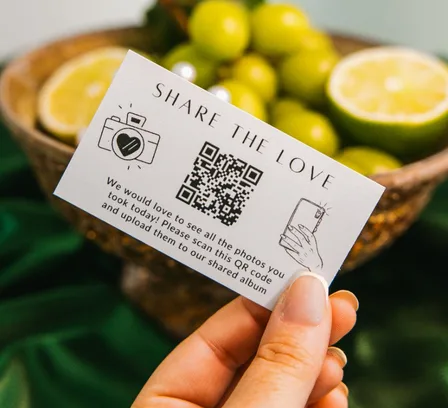
QR code · Their phone · 20 seconds
Wedibox
A QR code guest book that every guest can reach from the table. Guests scan with their camera, leave a message, attach a photo, and they are done. Works at the venue and from anywhere in the world.
Setup takes less time than writing your vows. Your digital wedding guest book is live before your welcome drink. Here is the process.
Set up your event
Enter your names, wedding date, and a welcome message. This becomes the page guests see when they scan your QR code.
Choose what to collect
Decide which formats guests can submit: written messages, photos, videos, voice recordings. Turn each on or off based on what matters to you.
Grab your QR code and link
Wedibox generates both instantly. Use whichever works best for your invitations, signage, and day-of reminders.
Get it in front of guests
Print your QR code on table numbers. Add your link to your wedding website. Have your DJ mention it. The more places it appears, the more contributions you get.
Guests contribute from their phones
They scan, tap, and upload. Written messages take thirty seconds. Photo uploads take less. Voice recordings happen on the spot.
Review, display, and download
Watch uploads arrive in real time. Approve what you want to show on your live slideshow. After the wedding, download your guestbook and keep it forever.
More than signatures. Your guestbook collects stories, voices, and faces in one place your whole family can revisit for years.
Guests upload straight from their phones. The blurry dance floor shots, the ceremony tears, the sparkler exit. Your photographer captures the posed moments. Your guests capture the unscripted ones.

 12
12

 8
8
 24
24
 +20
+20
Paper guestbooks get signatures. Digital guestbooks get paragraphs. Guests write stories, share advice, and say things they would never fit on a single line.
Enable audio recording and guests leave voice notes. Build a collection of voices you will want to hear again long after the wedding ends.

Guest uploads appear on a screen in real time. Photos roll in, guests cheer when they see their shots go live, and your reception has another source of entertainment.





Live slideshow
1 / 5
Priya What an entrance!
Marcus The speeches made me cry
Tom Dance floor is officially open
Aunt Carol Not a dry eye in the room
Jess He actually hit the high note
Your guests already have their phones out. Wedibox meets them there. Scan a QR code, tap a button, contribute a memory. The interface disappears and the participation happens.
QR Code Access for Everyone
Print your code on table cards, your welcome sign, and your invitations. Guests scan and contribute in seconds.
App-Free for Guests
Wedibox runs in any phone browser. There is no reason for a guest to say later.
Matches Your Wedding Style
Pick colors, fonts, and prompts. Your guestbook feels like an extension of your celebration.
You Decide What Goes Public
Approve submissions before they appear. Hide anything you want. You control what guests see and what stays private.
No Cap on Contributions
Every photo, video, and message lives in your secure dashboard. Download everything whenever you want.
Everything Stays Organized
Photos, videos, messages, and voice recordings are searchable, downloadable, and sorted by guest.
Supports Multiple Languages
Guests contribute in the language they speak. Useful when your families span countries.
Works on Any Device
Any smartphone and any browser. Guests in their 80s contribute without help.
A virtual guest book includes everyone, not just the guests who happened to find the pen.
The emotional texture of your wedding, captured by the people who know you best. That is what a digital guestbook preserves that paper never will.
Wedibox travels with you through every wedding event.
The same QR code works across every event. Contributions collect in the same guestbook. Your wedding story builds over weeks, not hours.
Most guestbook tools do one thing. Wedibox does everything.
| Feature | Wedibox | GuestPix | GuestCam | Kululu |
|---|---|---|---|---|
| Written guestbook | ✓ | ✓ | Not listed | Not listed |
| Audio messages | ✓ | Video only | ✓ | Not listed |
| Video messages | ✓ | ✓ | Not listed | Not listed |
| Unlimited uploads | ✓ | ✓ | ✓ | 500 at $39 |
| Free tier | 50 uploads | 50 photos, 30 days | ✕ | 100 uploads, 7 days |
| Live slideshow | ✓ | ✓ | ✓ | ✓ |
| Original quality ZIP | ✓ | ✓ | ✓ | High quality |
| RSVP with meals | ✓ | Invites | Not listed | Not listed |
| Seating chart | ✓ | Not listed | Not listed | Not listed |
| Wedding website | ✓ | Not listed | Not listed | Not listed |
| Registry links | ✓ | Not listed | Not listed | Not listed |
| One time price | $29 to $79 | $49 to $119 | $49 or $97 | $39 or $99 |
Other platforms make you choose. Wedibox gives you all of it.
Checked on each vendor site on July 28, 2026. A cell says not listed when a company does not publish that feature. Full detail in the GuestPix, GuestCam, and Kululu comparisons. For a ranked list with prices, read our guide to the best digital wedding guest books.
★★★★★
The perfect guestbook solution
It was the perfect solution for the bride who wanted a guestbook with photos. We were so happy with the product we used them again when my daughter got married.
★★★★★
We relived our wedding
We used this as our guest book. It was affordable and easy to use. My favorite part about it was being able to relive our wedding through the eyes of our guests.
★★★★★
A beautiful way to capture the day
Everyone enjoyed being able to click on the guestbook and see the pictures and videos as they were coming up live and it gave us such a beautiful way to capture our special day.
Place Your QR Code Everywhere
Reception tables, cocktail hour signage, bathroom mirrors, welcome bags. Guests cannot contribute if they do not see it.
Announce It Out Loud
Have your DJ or MC remind guests to scan and share. A verbal prompt lifts participation.
Use Prompts for Better Responses
"Congratulations" is what you get when you ask for nothing. "What is your favorite memory of us?" gets stories.
Review Before You Display
Turn on moderation so you approve photos before they hit the live slideshow. Keeps surprises under control.
Download Everything After
Your guestbook content belongs to you. Download the full archive and back it up somewhere permanent.
Invite Late Contributions
Include your guestbook link in thank-you cards. Guests who forgot to upload will remember when they see it again.
Your guestbook connects to everything else Wedibox offers. Guests scan once and access it all. Voices, photos, messages, and RSVPs flow to the same place.
Guest Photo & Video Uploads
Your guests capture moments you will never see yourself. Give them a way to share those photos and videos directly to your private gallery.
RSVP & Guest List
Guests scan, tap yes or no, and they are done. You watch responses roll into your dashboard while everyone else refreshes their spreadsheet.
Audio Guestbook
Hear your grandmother's blessing. Your best friend's terrible toast. The voices of people you love, recorded in the moment and yours to keep.
Seating Chart
Your confirmed guests flow straight into your seating chart. Drag names to tables and share a map guests can scan on the day.
Wedding Website
Your schedule lives here. Your love story lives here. Your RSVP link, photo gallery, and every detail guests keep asking about.
Registry
Connect your registry so guests can scan and shop. Whether you are registered at one store or five, everything lives behind one QR code.
Never. Wedibox runs in any mobile browser. Guests scan your QR code and start contributing immediately.
Yes. Every photo, video, message, and voice recording downloads in full quality. Your guestbook content belongs to you.
Your content lives in private cloud storage. You control visibility, moderation, and access. Nothing goes public unless you share it.
Scanning a QR code and tapping upload is the entire process. If a guest can send a text, they can use Wedibox. Guests in their 80s contribute without help.
These guides walk through the exact screens, with real screenshots. You can check how it works before you sign up.
How to collect written messages from guests
Let guests write you notes and well wishes from their phones, and find every message on your Guestbook page.
Read the guideHow to set custom prompts for messages and voicemails
Write the prompts guests see before they leave a message or voicemail, so you get stories instead of one-liners.
Read the guideHow to collect video messages
Let guests attach a video to their guestbook message and watch every one on your Guestbook page.
Read the guideA guestbook should make you feel something when you open it. Wedibox fills yours with voices, faces, stories, and moments you would never capture otherwise.
Free to start · No app to install
Still wondering if it is right for you? See how Wedibox works or contact us. We are here to help.