Open RSVP vs. guest list RSVP: which should you use?
RSVPAll-in-One plan
Wedibox RSVP runs in one of two modes, and picking the right one is the single decision that shapes everything else. You choose it on the RSVP page’s Guest list tab, under “Who can reply?”; two cards: Open door and Invitation only. New events start on Open door, and you can switch anytime; replies you already have are kept either way.
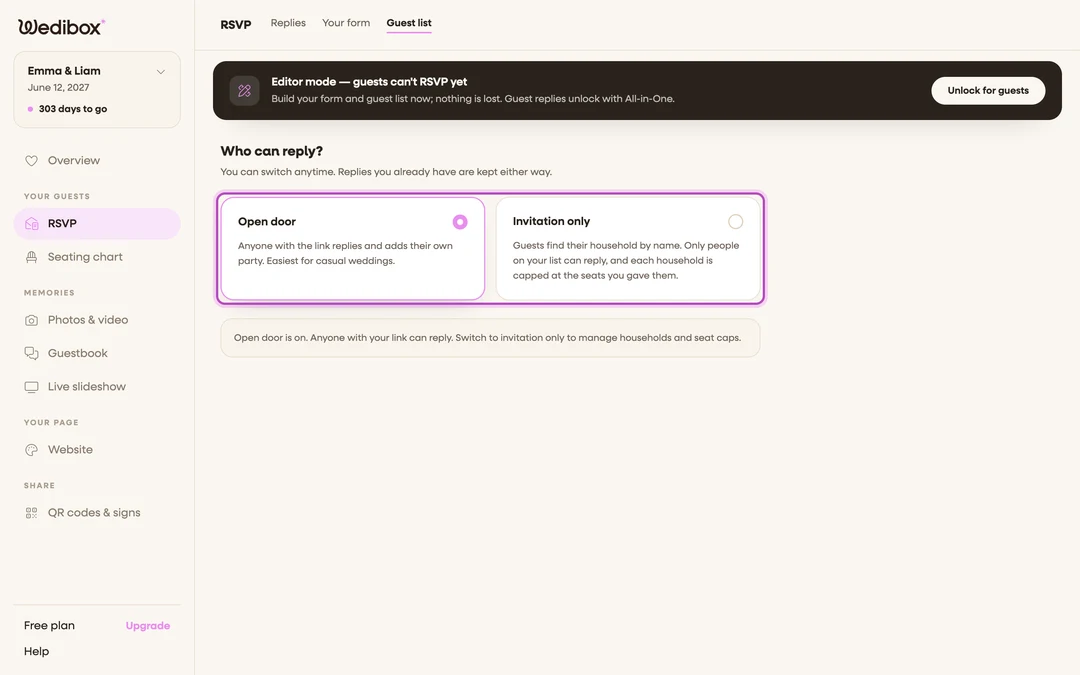
The two modes side by side
| Open door | Invitation only | |
|---|---|---|
| Who can reply | Anyone with your link or QR code | Only households you’ve added to your guest list |
| How guests start | Straight into the form; they type their own names | They search their name, pick their household, and their invitation loads |
| Party size | Guests add their own party members (you can switch this off with Let guests add party members) | Capped per household; each household gets a set number of seats and can never reply for more |
| Pre-filled names | No | Yes; names you put on the invitation appear automatically |
| Per-event control | Everyone sees every event on the form | You can limit each household to specific events (reception only, for example) |
| Changing a reply later | Same phone or computer only | From any device; guests just search their name again |
| Setup work | None | Add households by hand or import a spreadsheet |
What “Invitation only” actually does
This is the part that trips people up, so here is the exact behavior:
- Guests type their first or last name and see only matching households. Nobody can browse or scroll your guest list.
- Each household replies once, together. A household with 4 seats can submit 1–4 guests, never 5. The form says “Your invitation allows up to 4 guest(s)” and stops there.
- A household that isn’t on your list can’t reply at all; the form says it couldn’t find an invitation under that name.
Choose Open door if…
- You’re sharing the RSVP by word of mouth and don’t keep a formal list.
- Plus-ones are flexible and you trust guests to reply for their own party.
- You want zero setup; turn RSVP on, share the link, done.
Choose Invitation only if…
- You have a headcount budget and per-household limits matter.
- You’re printing invitations addressed to specific households.
- Different guests are invited to different events (rehearsal dinner vs. reception).
- You want guests to be able to update their reply later from any device.
FAQ
Can guests see my guest list? No. The name search returns only households matching what they typed, and only your household appears in the results.
What happens to existing replies when I switch modes? Nothing; replies you already have are kept either way. Switching to Invitation only just means new guests must find their household first.
Can a household bring more people than I allowed? No. The seat cap is a hard limit on the form. They can always reply with fewer.
A guest says they can’t find their name; why? Their household name or invitation names are spelled differently on your list, or they aren’t on it yet. Check the spelling on the Guest list tab, or add them.
Do custom questions and sub-events work in both modes? Yes. Meals, song requests, and the event schedule behave the same; only who can reply changes.