How to download all your wedding photos and videos
Photo sharingWedding plan and up
Your gallery lives on Wedibox for your whole storage period, but you’ll want a copy on your own drive too. The Download card packages every photo and video into a ZIP, prepared on our servers and emailed to you when it’s ready, at the size each file was uploaded.
Plan: Wedding plan and up · Where: Photos & video (under “Memories”) → Download card
Before you start
- Your event must be activated; trial events see “Event must be active to request a zipped folder.”
- The ZIP goes to your account email, so make sure you can receive mail there.
- The ZIP contains what exists at the moment you request it. If guests are still uploading, wait, or request again later; you can download as often as you like.
Steps
-
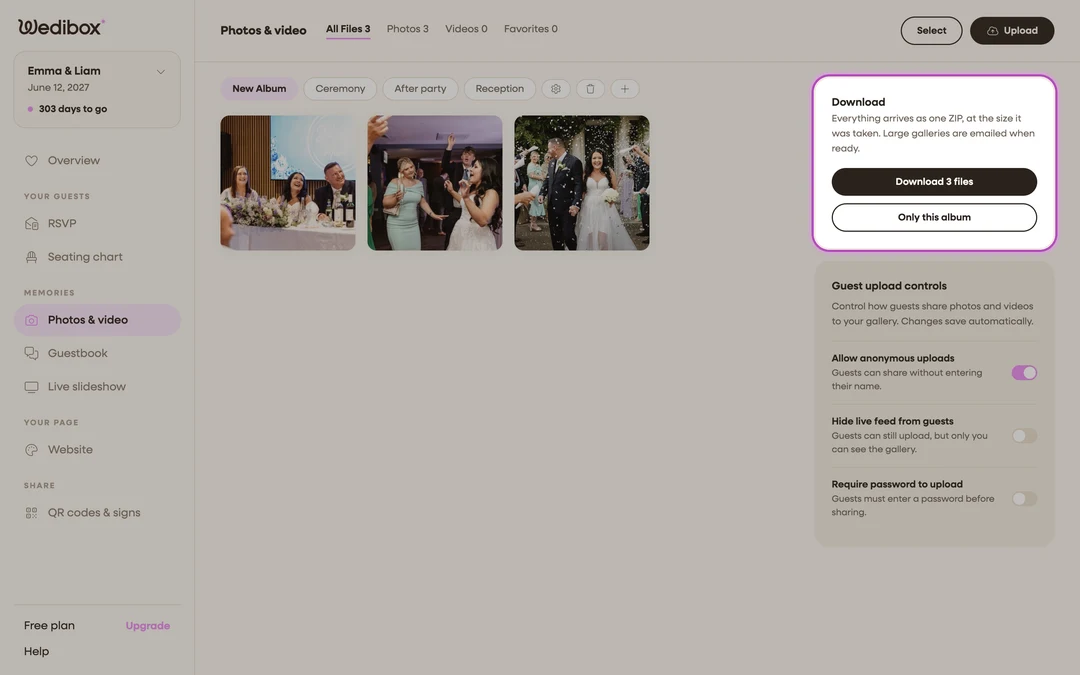
Open Photos & video. In the sidebar, click Photos & video (under “Memories”). The Download card is at the top of the right-hand column, with a live count of every file across all your albums.
-
Request the ZIP. Click the Download … files button. Our servers start packing your gallery, and the button changes to Preparing your ZIP…. Large galleries take a few minutes; you can close the page.
-
Open the emailed link. When packing finishes, the download link arrives at your account email. You can also come back to this card; once the ZIP is ready, clicking the download button saves it directly.
-
Grab every part if there are several. Very large galleries are split into parts. In that case a Your Zipped Folders popup lists Download Part 1, Download Part 2, and so on. Download each one; together they hold everything.
-
Need just one album? Use Only this album. Select the album pill you want, then click Only this album. Your browser builds that ZIP on the spot; keep the tab open until it saves.

What you should see
A ZIP (or several parts) on your computer containing your photos and videos at the size they were uploaded. The card’s note confirms how long your gallery stays available: “Your gallery is stored until …. Download as often as you like.”
If something goes wrong
- “Event must be active to request a zipped folder”. Full-gallery ZIPs are part of activation. Activate your event first, then request again.
- Photos uploaded after your request are missing. That’s expected: “Your zip folders include uploads available at the time of request, but any uploads made afterward won’t be included.” Request a fresh ZIP after the last uploads arrive.
- “Failed to download this album, please try again”. The in-browser album ZIP hit a network hiccup. Retry on a stable connection, or use the full emailed ZIP instead.