How to add Wedibox to a Squarespace website
Embed widgetEmbed widget
Squarespace supports custom code through Code Blocks, so the Wedibox widget can sit directly on your Squarespace wedding website. Guests upload photos and watch the gallery grow without leaving your page.
Plan: Embed widget · Where: wedibox.com/w/embed/setup → select Squarespace
Before you start
- You need edit access to your Squarespace site.
- Squarespace’s Code Block is available on its standard website plans; if your plan doesn’t include code blocks, use the shareable link from the same Wedibox screen instead.
- The Free embed plan (up to 50 uploads) covers setup and testing.
Steps
-
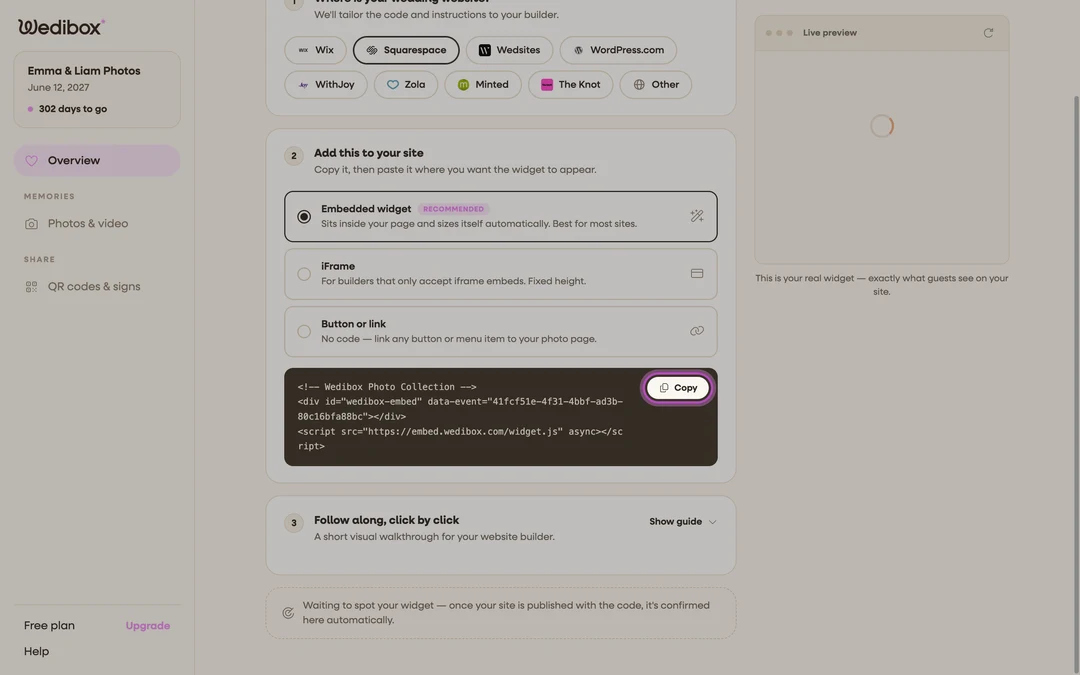
Get your embed code. Go to wedibox.com/w/embed/setup, select Squarespace, enter your event name and date, and create your free account. On the Add to Your Website step, keep Embedded widget selected and click Copy on the code box. A step-by-step Squarespace walkthrough appears on the same screen.
-
Edit your page. In Squarespace, open the page where you want photo sharing and click Edit in the top-left corner.
-
Add a Code Block. Click an insert point (+) and choose Code from the menu.
-
Paste the code. Paste the Wedibox snippet into the block, make sure the display is set to HTML, and click Apply. While you’re still editing, Squarespace may show a placeholder instead of the live widget. That’s normal.
-
Save and test. Save the page, open your site’s public URL on your phone, and do a test upload from the widget’s Share Your Photos button.

What you should see
On the live page (not editor preview), the upload widget renders in your accent color where the Code Block sits. Test uploads appear in the widget’s gallery and on your embed dashboard, and your Squarespace domain appears in the Overview tab’s Active Installations card after the first view.
If something goes wrong
- You only see raw code on the page. The block’s display mode isn’t HTML. Edit the Code Block and switch it from Markdown/text to HTML.
- The widget shows in preview but not on the live site. Script embeds only run on the published site on some Squarespace plans. Check the live URL, and if scripts are blocked entirely, use the iFrame version from the Wedibox code screen.