How to log in, reset your password, or use Google sign-in
Getting startedAll plans
The login page lives at wedibox.com/w/auth/login (“Log in” on wedibox.com takes you there). Find your symptom below.
You can’t log in
Usually one of three things: a typo, the wrong email, or an account that was actually created with Google.
- Re-enter your Email and Password, using the eye icon to see what you’re typing.
- Try the other email addresses you use. Your account lives on whichever one you signed up (or claimed your event) with.
- Think back to signup: if you used the Google button then, you may have no password at all. See the Google section below.
- Still stuck? Reset the password (next section).

You forgot your password
Cause: passwords are forgettable. The reset takes two minutes.
-
On the login page, click Forgot password?
-
Enter the email you registered with and click Reset Password. You’ll see “Reset Email Sent!”; check that inbox (and spam).
-
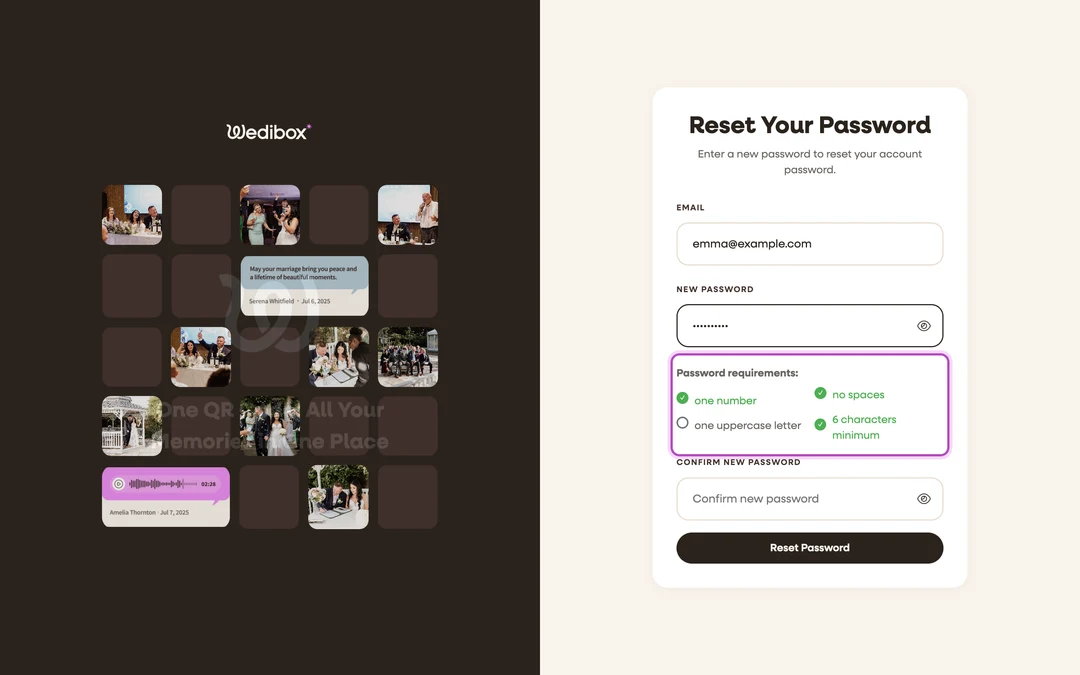
Open the link in the email. Enter your New Password and Confirm New Password. Passwords need one number, one uppercase letter, no spaces, and at least 6 characters; the checklist under the field ticks off each rule as you type.
-
Click Reset Password. On “Password Changed!”, click Log in and sign in with the new password.

The reset email never arrives
Cause: wrong address, spam filter, or a Google-only account.
- Check spam and promotions folders for a Wedibox email.
- Re-request with any other address you might have used.
- If nothing lands, the account is likely Google sign-in only. Go to the login page and click Google instead.
Your reset link doesn’t work
Cause: reset links expire, and a link can only be used once.
- On the reset screen, click Request New Token. It returns you to the forgot-password form.
- Request a fresh email and use the new link right away.
You signed up with Google
There’s no password to remember. On the login page, click the Google button and pick your Google account. That’s the whole login. Use it every time; it always reaches the same Wedibox account as long as it’s the same Google email. If you’d rather have a password too, run the forgot-password flow on that same email address.
You don’t have an account yet
The Register link on the login page sends you to the get-started flow, where creating an account and creating your event happen together. Follow How to create your Wedibox event. If someone sent you a claim link for a ready-made event, use that link instead; see How to claim an event.
You keep getting signed out
Cause: the session isn’t being remembered on this browser.
- Tick Remember me before you click Log In.
- If it persists, your browser may be clearing site data on close. Check its cookie settings for wedibox.com.