Activation date vs. wedding date: how timing works
Plans & billingAll plans
Two dates sound similar and do completely different jobs. Your wedding date is what guests see: it drives your page, your countdown, and nothing about billing. Your activation date is what starts the clocks: the day guests can begin uploading, and the day your upload window and storage period start counting. The app says it directly when you buy: “Buy now, activate later. Your upload window starts on the day of your event, not the day you pay.”
The two dates side by side
| Wedding date | Activation date | |
|---|---|---|
| Where you set it | Event details (and your page header) | During activation, in the Activation Date field |
| What guests see | The date and countdown on your page | Nothing. It just opens uploads |
| Starts your upload window | No | Yes |
| Starts your storage period | No | Yes |
| Affects what you pay | No | No. Same price whenever it starts |
Both clocks start on the same day. On Wedding (1-year), for example, guests can upload for 6 months from your activation date, and your gallery stays online for 1 year from that same date, not 1 year from when uploads end. The full per-plan numbers are in Upload period vs. storage period explained.
Why buying early costs you nothing
Because the clocks start on the activation date, activating “later” doesn’t waste a day of your plan. Couples often buy weeks or months ahead (to unlock website sections, RSVP, or the guestbook for setup) and schedule the upload window itself for the wedding.
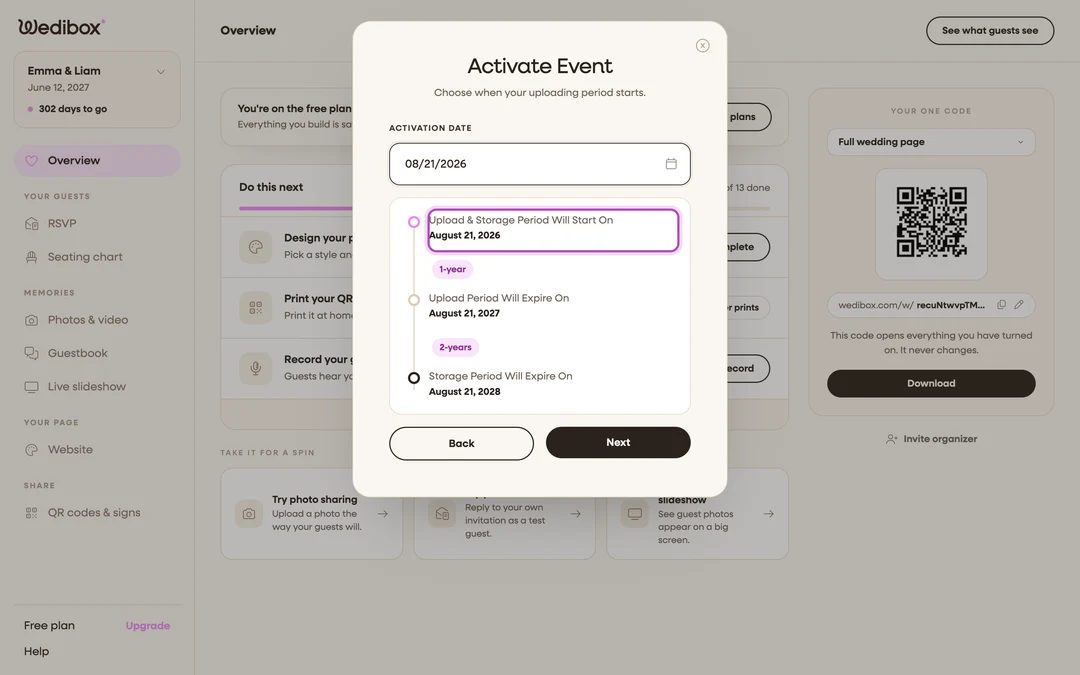
The app now leads with this choice. When your wedding date is still ahead, the timing step offers Start on your wedding day as the Recommended option, with Activate Now and Schedule for Later beside it. Schedule for Later pre-fills your wedding day too, so you only change the date if you want something different. Before you pay, the checkout summary prints the result in plain dates: “Uploads {start} to {end}” and “Stored and downloadable until {date}”. When you choose Schedule for Later, the date step also shows a three-point timeline: Upload & Storage Period Will Start On, Upload Period Will Expire On, and Storage Period Will Expire On.
Our recommendation
Pick Start on your wedding day, or choose Schedule for Later and move the date a few days earlier if you want guests uploading rehearsal-dinner photos. That way the entire upload window sits after the wedding, when the photos actually arrive. After activating, your Overview confirms it: “All set. Your year starts on your wedding day,” with the date uploads open and a Scheduled badge.

FAQ
Can guests upload before my activation date? Uploads open on the activation date. That’s the point of scheduling it. Your page itself is live and viewable the whole time.
I activated today by mistake. Did I lose my window? Choosing Activate Now starts both clocks today. While your event is still scheduled, you can change the date yourself from your event details. Once the event is live, contact support about moving the start date.
Where do I see my dates later? On your Overview: the lifecycle banner shows the current state, and clicking the Scheduled badge opens the Activation Timeline with all three dates.
Does changing my wedding date change my activation date? No. Editing the wedding date in Event details only changes what guests see.