Upload period vs. storage period explained
Plans & billingAll plans
Every paid Wedibox plan runs two clocks, and both start on your activation date.
- Upload period: how long guests can add photos, videos, and messages to your event.
- Storage period: how long your gallery stays online for you and your guests to browse, relive, and download.
The storage period is always the longer one, and it runs from the activation date too, so after uploads close, you still have the rest of your storage period to enjoy everything.
The clocks by plan
| Package | Upload period | Storage period |
|---|---|---|
| Wedding (1-year) | 6 months | 1 year |
| Wedding (2-year) | 1 year | 2 years |
| All-in-One (1-year) | 1 year | 2 years |
| All-in-One (2-year) | 2 years | 5 years |
Example: you activate All-in-One (1-year) on your wedding day, June 6. Guests can upload until June 6 the following year; your gallery stays online until June 6 the year after that.
What each phase feels like
While uploads are open: your page collects everything; the Overview banner shows “Your page is live” with the photo count.
When uploads are ending: the Overview warns you, “Guests can upload for {X} more days,” with an Extend button if photos are still trickling in.
After uploads close: the banner switches to “Uploading has ended · your memories are safe. You can still browse and download everything until {date}.” Nothing is lost; guests just can’t add more.
When storage is ending: the Overview warns “Your storage ends in {X} days” with an Extend button, and Wedibox emails you a storage page with three explicit choices. See What happens when your storage expires.
After storage ends: your gallery is archived, not deleted: “Storage ended, so browsing is paused. Everything is intact — bring it back online whenever you like.”

Where to see your exact dates
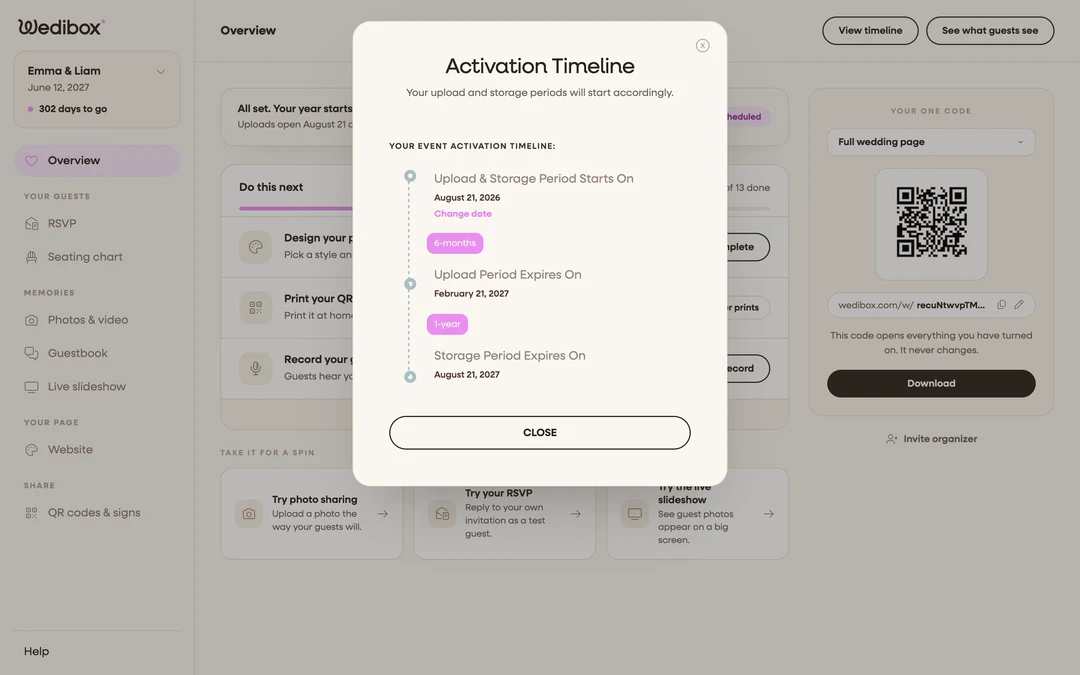
On your Overview, click the Scheduled badge (before activation day) to open the Activation Timeline. It lists all three dates: Upload & Storage Period Starts On, Upload Period Expires On, and Storage Period Expires On.
FAQ
Can I extend one clock without the other? Yes. Extending your upload period adds uploading time; extending your storage adds a year of online access. Each is its own one-time payment.
Do the clocks start when I pay? No. They start on your activation date. See Activation date vs. wedding date.
Can I download everything after uploads close? Yes. Downloading works for the whole storage period. As the app puts it, “Your gallery is stored until {date}. Download as often as you like.”