How to create a venue showcase page
For partnersPartner program
The showcase is a public page of real weddings at your venue: real candids from real couples, not styled shoots. Feature the weddings you’ve hosted with one click each, add an inquiry button, and share the link with prospects or embed it on your site.
Plan: Partner program · Where: Partner portal → Free tools → Build your showcase
Before you start
- The best showcases come from your Wedibox couples: any confirmed couple can be featured with one click, cover photo and photo count included. Gift a few events first and the page fills itself.
- For weddings that weren’t on Wedibox, have a photo ready per wedding (PNG, JPEG, or WebP).
Steps
-
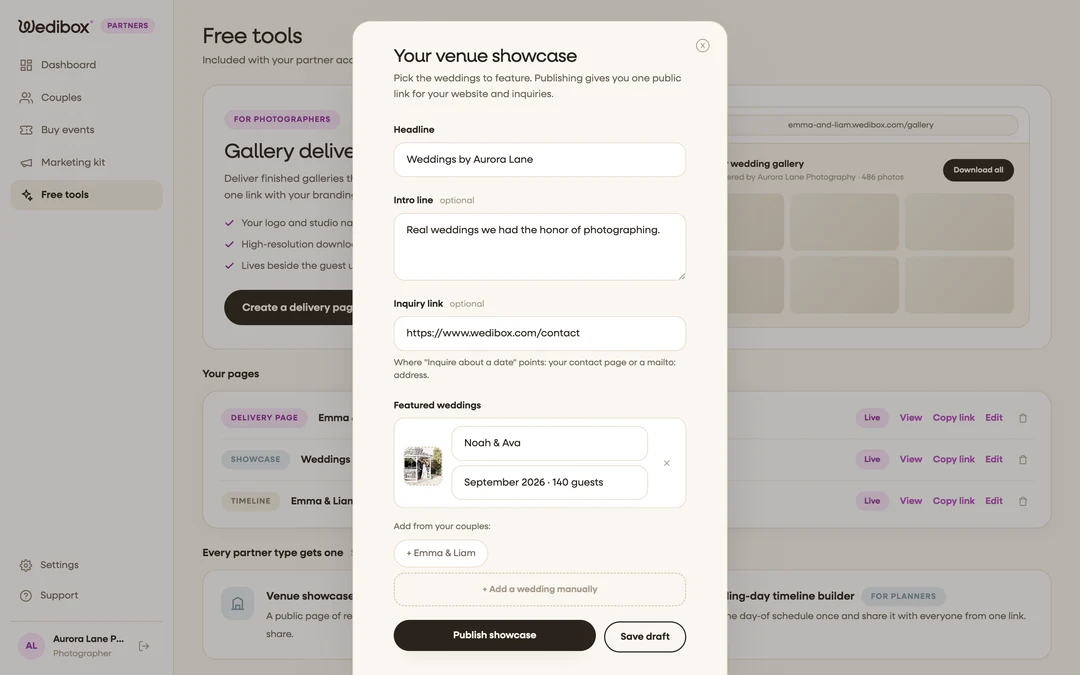
Open the showcase editor. In Free tools, click Build your showcase. You have one showcase per account; reopening the editor always edits the same page.
-
Write the headline and intro. The Headline defaults to “Weddings at {your venue}”; add an optional Intro line underneath.
-
Point the inquiry button somewhere. Paste your contact page URL (or a mailto: address) into Inquiry link. This powers the Inquire about a date button on the public page; leave it blank and the button simply doesn’t render.
-
Feature your Wedibox couples. Under Featured weddings, click any chip in the “Add from your couples” row; the wedding drops in with the couple’s names, month, cover photo, and photo count already filled.
-
Add other weddings manually. Click + Add a wedding manually, upload a photo, and type the couple’s names and a detail line (“September 2026 · 180 guests”). Remove any row with its X.
-
Publish. Click Publish showcase. The public link is copied to your clipboard automatically; Save draft keeps your edits private instead.
What you should see
The public page opens on a hero photo with your headline, then a card grid of your weddings; cards from Wedibox couples link through to their galleries. A dashed card promises “The next wedding adds itself”, and if you set an inquiry link, prospects get a Planning your wedding here? block with the Inquire about a date button.

If something goes wrong
- A couple’s chip doesn’t appear. Only confirmed couples show in the “Add from your couples” row; approve their redemption first, and check they’re not already featured.
- You want a wedding off the page. Open the editor, remove its row with the X, and publish again.