Shipping options and tracking your print order
QR codes & printsAll plans
Print orders leave the printer within 48 hours of purchase; after that, the shipping method you chose sets the pace. Every order gets live tracking, so you always know whether your signs are printed, in transit, or already waiting at the door.
Plan: All plans · Where: Sidebar → Orders
Before you start
- Work backward from the wedding date. The print catalog does this math for you: its banner reads “Order by {date} to have your prints before the day”, where the date is your wedding date minus 14 days (48 hours of printing plus the shipping window). Once that date has passed the line disappears, and Priority becomes the safer pick.
- Decide where they should land: your home, or straight to the venue. There’s no special toggle. The order ships wherever you enter the address at checkout, so shipping to the venue just means entering the venue’s address (add the venue name in the address line so the front desk knows whose box it is).
Steps
-
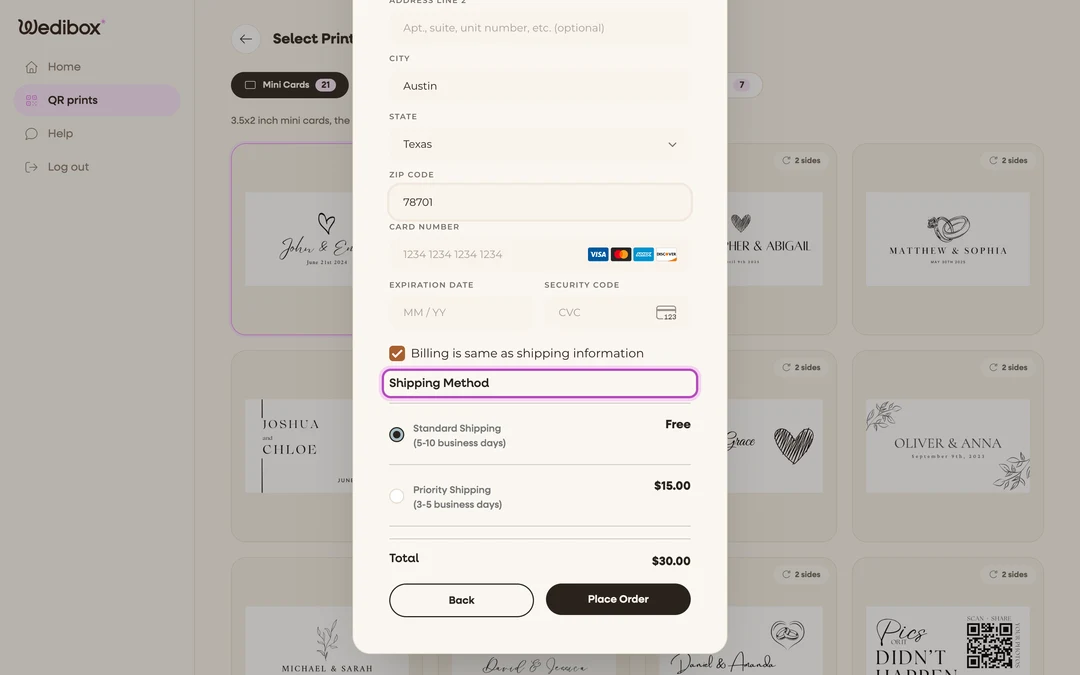
Choose a shipping method at checkout. After your address is filled in, the Shipping Method options appear with live prices:
- Standard Shipping (5-10 business days): free on US orders.
- Priority Shipping (3-5 business days): US orders.
- Worldwide Shipping (8-12 business days): orders outside the US.
The list adapts to your address: US addresses see Standard and Priority, international addresses see Worldwide.
-
Place the order. Click Place Order. The confirmation includes your estimated delivery.
-
Open your orders. In the sidebar, click Orders (it appears once you have at least one order). The Orders History list shows each order with its status and estimated delivery date.
-
Open an order’s details. Click an order to see Estimated Delivery, Delivery Addressee, Delivery Address, and the Tracking History.
-
Read the tracking states. Orders move through: Order Placed (“We have received your order”) → Order Processed (“We have printed and processed your order”) → On The Way (“Your order has been shipped”) → Delivered. Two extra states only appear if something goes sideways: Delivery Failed and Returned To Sender.
-
Follow the carrier. Once the order is on the way, Click to View Tracking opens the carrier’s live tracking page with the tracking number.
What you should see
A box of cards or signs at the address you gave, on or before the estimated date. Scan one straight out of the box. It should open your page instantly.
If something goes wrong
- The order says “Requires Action”: the design setup wasn’t finished. Open the order and complete the design steps so printing can start.
- Tracking shows “Delivery Failed” or “Returned To Sender”: the carrier couldn’t deliver (wrong or incomplete address is the usual cause). Contact support through Help in the sidebar with your order details to arrange redelivery.
- The wedding is close and Standard feels risky: choose Priority, or switch to the DIY route as a backup: print your QR code yourself same-day.