How wedding photo sharing with a QR code works
Getting startedAll plans
Your guests will take hundreds of photos at your wedding, and most of them normally stay trapped on their phones. Wedibox fixes that with one QR code: guests scan it, upload what they captured, and every photo and video lands in a single gallery only you control.
The short version
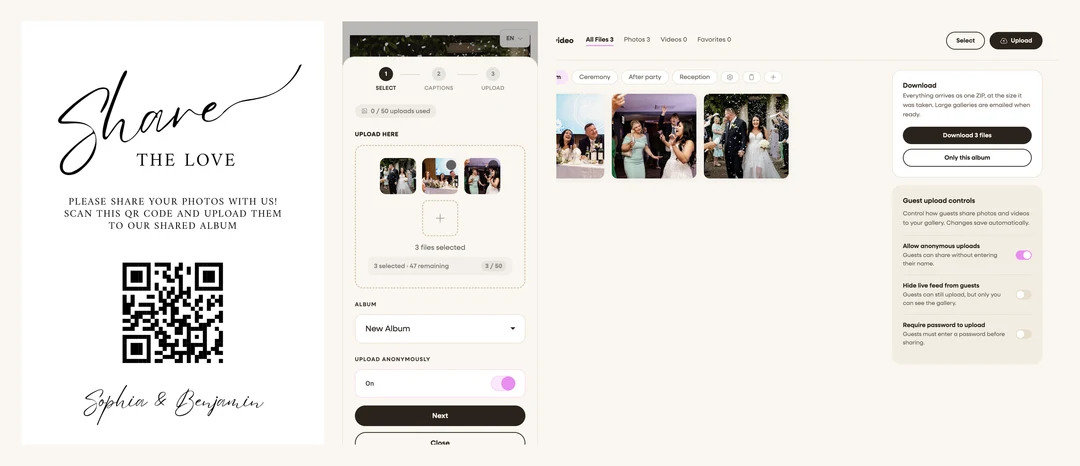
- Guests scan your QR code. You print it on table signs, cards, or your invitation. Scanning opens your wedding page in the phone’s browser, nothing to install.
- They upload in seconds. Guests tap the upload button, pick photos and videos, add their name (or stay anonymous if you allow it), and they’re done.
- Everything lands in your gallery. You browse, sort into albums, favorite, hide, or download everything, and you can project a live slideshow at the reception.
What makes it work
| Piece | How it works |
|---|---|
| No app needed | Everything runs in the phone browser: iPhone, Android, or a laptop. Guests never create an account. |
| One code, everything | Your QR code opens your whole wedding page: photo upload, guestbook, RSVP, and more, depending on what you turn on. |
| The code never changes | Download it the day you create your event and print it whenever you like. It always points to your page. |
| Focused codes (optional) | From your dashboard you can also generate codes that open just photo sharing, just the RSVP form, or just song requests. |
| Your gallery | Uploads appear in your private dashboard in real time. Albums keep them organized; you decide whether guests can browse each album. |
| iPhone-friendly | HEIC photos from iPhones are converted automatically, and large files are compressed so uploads finish even on venue wifi. |
What it costs
Starting is free: you get your page, your QR code, a shareable link, and up to 50 guest uploads. Paid plans unlock unlimited photos and video, the audio guestbook, the live slideshow, and (on All-in-One) RSVP replies, seating lookup, and full website sections. See How the free trial works.
FAQ
Do guests need an app or an account? No. The QR code opens a web page. Guests type a name (or upload anonymously if you’ve allowed that) and go.
When can guests start uploading? As soon as your page is live on the free plan (up to 50 uploads). When you activate a plan, you choose the date your upload window opens: right away or on your wedding day.
Can I test it before the wedding? Yes, and you should. Scan your own code and upload a photo. See How to do a test upload before the wedding.
What if someone can’t scan the code? Every event also has a plain link (wedibox.com/w/your-names) you can text or add to your website. Same page, same gallery.
Is the gallery public? Your page is only reachable by people who have the code or link, and you control whether guests can see each other’s uploads at all. See Upload settings explained.