A tour of your partner dashboard
For partnersPartner program
Your dashboard is the home tab of the partner portal: your code, your balance, and a live picture of every couple you’ve gifted. Here’s what each piece does and where the other tabs take you.

The Overview page
-
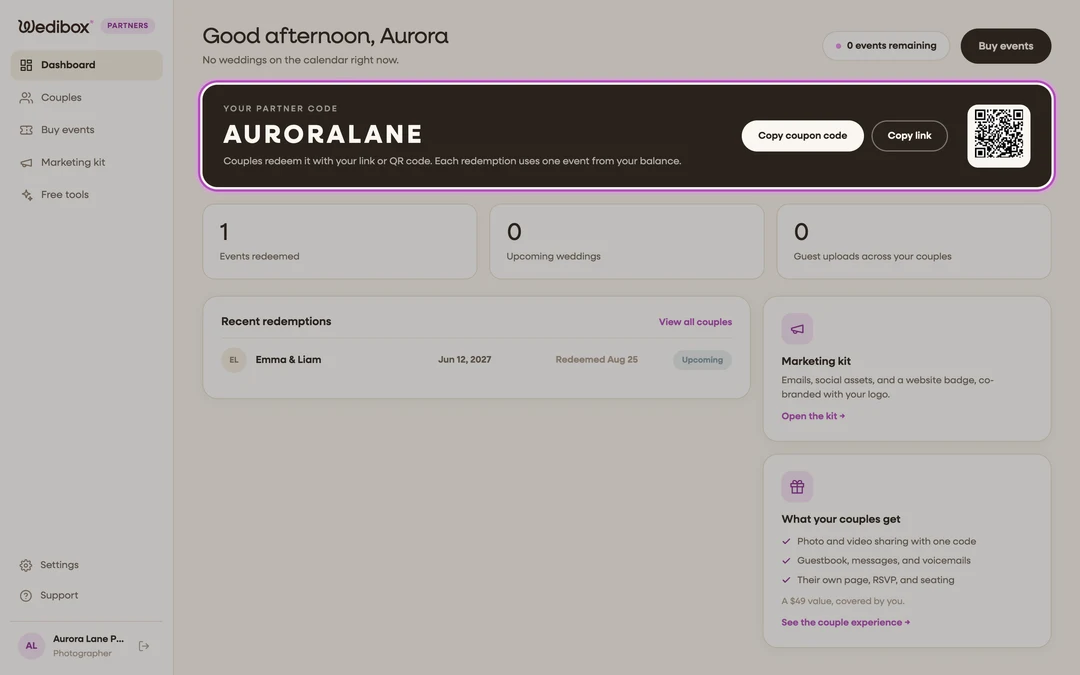
Your partner code sits in the dark card up top, with Copy coupon code and Copy link buttons and a QR code of your redemption link. This is the card you’ll come back to most; the sub-line reminds you that each redemption uses one event from your balance.
-
The stat row counts Events redeemed, Upcoming weddings, and Guest uploads across your couples, so you can see the program working at a glance.
-
Recent redemptions lists your latest couples with their wedding date and a status chip; click any row (or View all couples) to open their detail page.
-
The events pill in the header shows how many events you have left to gift, and the Buy events button tops you up when it runs low.
-
The right rail links into your Marketing kit and, once your couples start collecting photos, surfaces the freshest gallery (“{Couple}‘s guests have added {count} photos and messages so far”).

The sidebar tabs
- Dashboard: this Overview page.
- Couples: everyone who redeemed your code, plus invites still out; approvals happen here. See How to track couples and approve redemptions.
- Buy events: prepaid packs of 5, 10, or 20 events. See How to buy partner event packs.
- Marketing kit: your logo and brand color, ready-made emails, social assets, a printable flyer, and a website badge. See How to use the partner marketing kit.
- Free tools: the timeline builder, venue showcase, and gallery delivery pages included with your account. See Free partner tools: timeline, showcase, and delivery.
- Settings (bottom): your display name, partner type, and password.
- Finish setup appears above the tabs while onboarding is incomplete and removes itself when the three steps are done.
FAQ
Why does the greeting change? It follows the clock: “Good morning”, “Good afternoon”, or “Good evening”, plus the first word of your business name.
Where do I change my logo? In the Marketing kit tab (click Edit branding), not in Settings.
What does “events remaining” count? Your free pilot event plus any packs you’ve bought, minus every redemption. Pending redemptions count too; declining one returns it to your balance.